
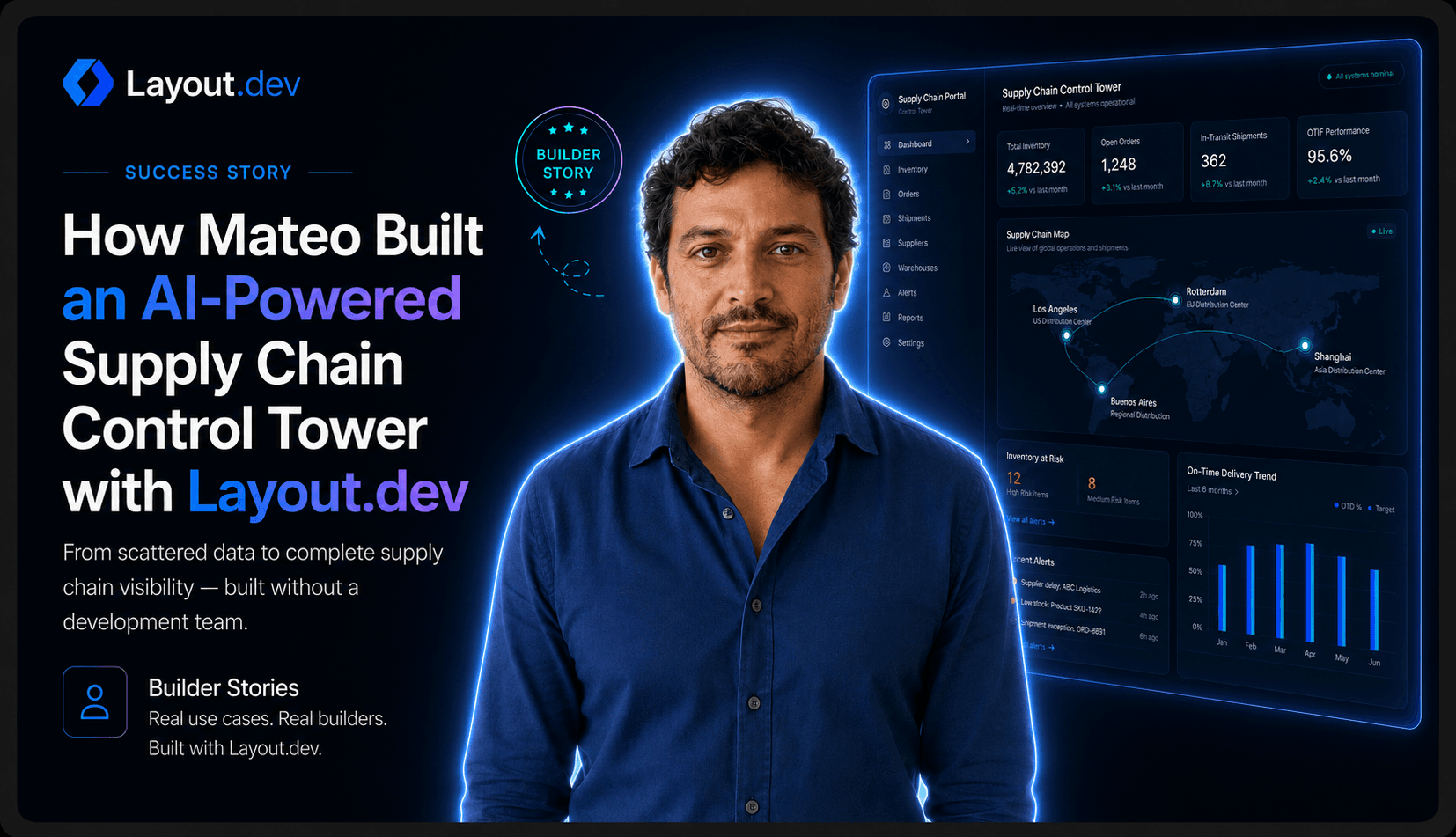
Meet Mateo

Mateo didn’t begin his career behind a management dashboard.
He started on the warehouse floor, working early shifts, checking incoming shipments, organizing inventory, and helping resolve whatever problem appeared that day.
Over time, he moved into inventory planning, procurement, and logistics before becoming a Supply Chain Operations Manager.
He earned that position by learning how every part of the operation worked—and how one small delay could affect everything that followed.
A late supplier could interrupt manufacturing.
A production delay could reduce available inventory.
A stockout could stop an order from reaching a customer.
Mateo understood those connections better than anyone.
But seeing the whole picture was becoming increasingly difficult.
“The operation was growing, but our visibility wasn’t growing with it.”
The Challenge
As the company expanded, its supply chain became more complex.
Supplier information lived in one system. Purchase orders were tracked elsewhere. Inventory updates arrived through spreadsheets, while delivery issues were often reported through emails and messages.
Every department had information.
No one had the complete picture.
Mateo and his team faced the same problems repeatedly:
- Supplier delays were discovered too late
- Inventory data was spread across different systems
- Stockout risks required manual investigation
- Purchase orders lacked one clear operational view
- Delivery issues were reported after they had already affected customers
- Teams spent more time finding information than acting on it
- Important risks were not always assigned a clear next step
The team wasn’t short on data.
It was short on visibility.
The Moment Everything Changed
The breaking point came when an important customer order was delayed because a high-demand product went out of stock.
The warning signs had existed.
The supplier was already behind schedule. Inventory levels had been declining, and the product was approaching its reorder point.
But those signals lived in different places.
By the time the team connected them, it was too late to prevent the disruption.
Mateo felt responsible.
Not because his team hadn’t worked hard, but because they lacked a system capable of showing them what was happening across the complete supply chain.
“We had the information. What we didn’t have was a way to connect it early enough to act.”
That experience gave Mateo a clear idea.
He wanted one control tower capable of monitoring suppliers, manufacturing, distribution, logistics, and delivery in real time.
A Clear Vision, but Limited Resources
Mateo knew exactly what the company needed.
He imagined a central dashboard where his team could monitor the health of the entire operation.
It would show:
- On-time, in-full performance
- Inventory turnover
- Stockout risk
- Open purchase-order value
- Supplier performance
- Manufacturing delays
- Aging inventory
- Logistics performance
- Delivery risks
- Recommended actions
More importantly, Mateo didn’t want another passive reporting dashboard.
He wanted a system that could identify an urgent issue, explain its operational impact, and recommend what the team should do next.
But building a platform this complete would normally require designers, developers, data engineers, and months of planning.
Mateo understood supply chains.
He didn’t know how to build software.
Discovering Layout.dev
Mateo discovered Layout.dev while researching ways to create an operational tool without starting a traditional software-development project.
Instead of writing code, he began by describing the operation.
He explained each stage of the supply chain, the performance indicators his team monitored, the risks they needed to identify, and the actions different situations should trigger.
Then, he started building.
“What surprised me was that I could describe the operation using the same language I already used with my team.”
Mateo didn’t have to translate his experience into technical specifications.
He could focus on the business problem.
Layout.dev helped turn that knowledge into a working product experience.
Building the Supply Chain Control Tower
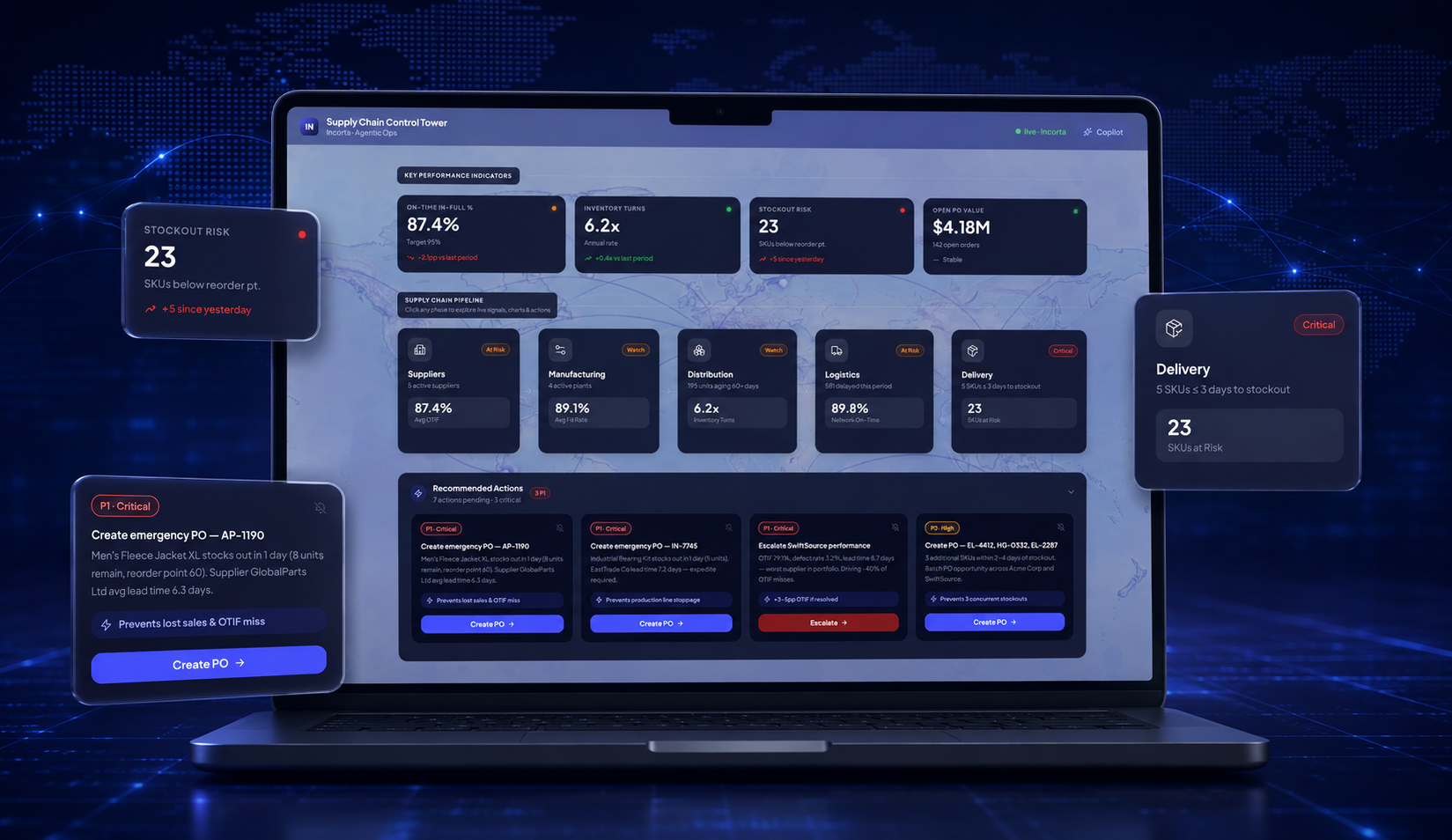
Mateo began with the main control-tower dashboard.
He wanted his team to open one screen and immediately understand the current state of the operation.
The dashboard brought together four critical performance indicators:
- On-Time In-Full: Whether customer orders were being delivered completely and on schedule
- Inventory Turns: How efficiently inventory was moving through the business
- Stockout Risk: How many products were approaching critical inventory levels
- Open Purchase-Order Value: How much inventory was currently tied to active supplier orders
This gave Mateo a high-level view.
But he also wanted the team to understand where each issue was happening.
Connecting the Complete Pipeline
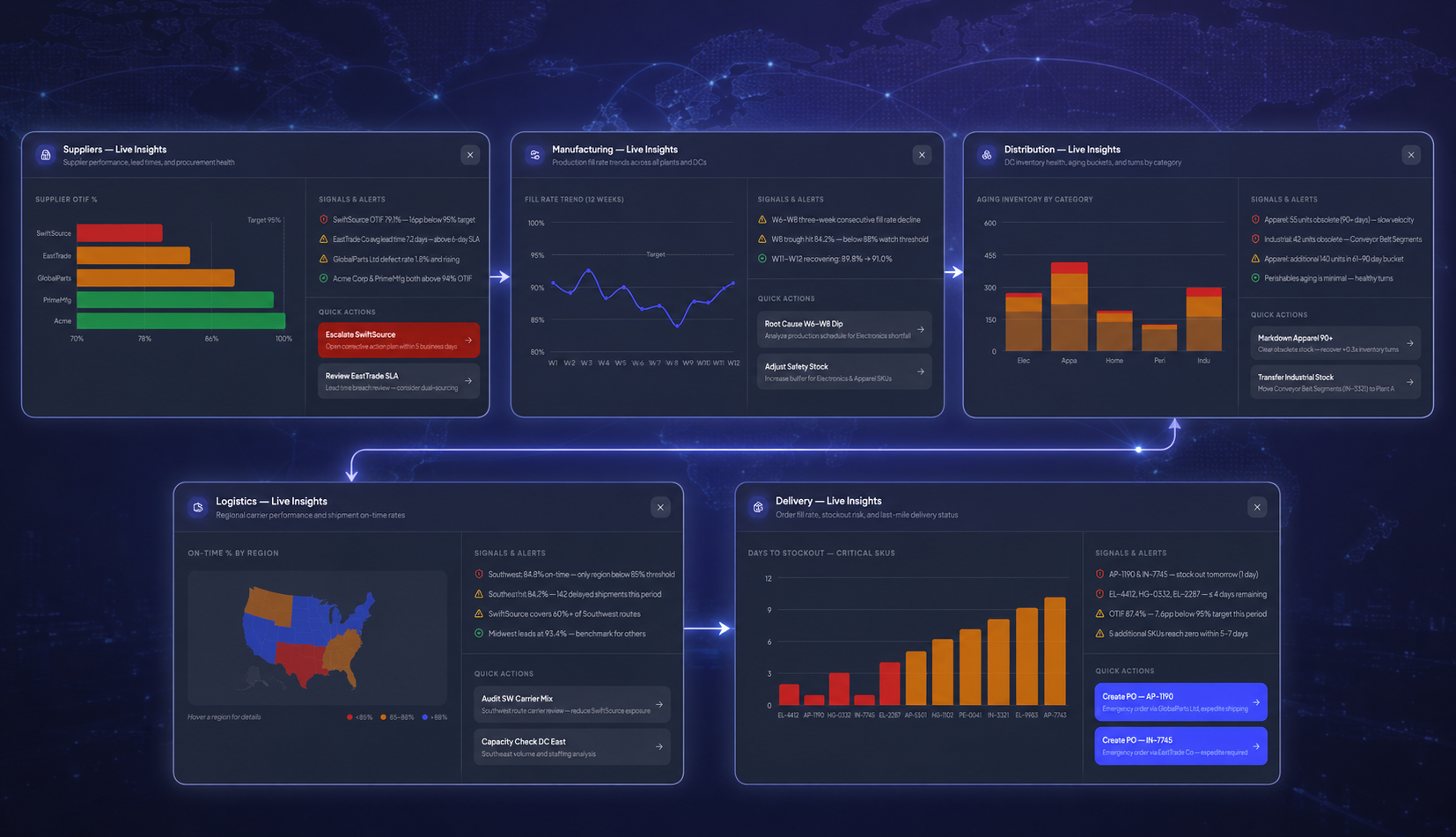
Mateo structured the platform around five connected stages:
Suppliers
The supplier view helped the team monitor availability, lead times, and performance issues before they affected production.
Instead of reviewing supplier reports separately, Mateo could quickly identify which relationships required attention.
Manufacturing
The manufacturing stage highlighted plant performance, production delays, and fulfillment rates.
This helped the team understand whether an inventory issue began with a supplier or inside the production process.
Distribution
The distribution view showed aging inventory and inventory turnover across the network.
Mateo could identify products sitting too long in one location while another area faced a shortage.
Logistics
The logistics stage tracked delayed shipments and network performance.
The team could see whether inventory existed but was failing to move through the network quickly enough.
Delivery
The final stage highlighted products at immediate risk of stocking out and customer orders that could be affected.
This allowed Mateo’s team to act before an internal issue became a customer-facing problem.
“Every stage had always affected the next one. Now, we could finally see those relationships in one place.”
The Control Tower in Action
[Insert Supply Chain Control Tower dashboard screenshot]
The main dashboard gives Mateo a complete operational view of the supply chain.
He can immediately see that on-time performance is below target, inventory turns are improving, and 23 products are at risk of stocking out.
The visual pipeline shows where attention is needed across suppliers, manufacturing, distribution, logistics, and delivery.
Instead of opening several reports, Mateo can begin with the full picture and investigate the areas requiring action.
Moving From Visibility to Action
Mateo didn’t want the control tower to stop at identifying problems.
Traditional dashboards had already shown his team plenty of problems.
The real question was always the same:
What should we do next?
He added a recommended-actions area that translates supply chain risks into specific operational responses.
The platform can recommend actions such as:
- Creating an emergency purchase order
- Expediting an existing order
- Escalating a supplier-performance issue
- Reallocating inventory
- Prioritizing a critical shipment
- Investigating products approaching a stockout
Each recommendation includes the reason for the action and the possible business impact.
An emergency purchase order might prevent lost sales.
A supplier escalation could improve delivery performance.
A faster response to declining inventory could prevent a production line from stopping.
This helped Mateo’s team move from monitoring the supply chain to actively controlling it.
“A warning is only useful if the team knows what to do with it.”
Prioritizing What Matters Most
Not every supply chain problem has the same impact.
Some issues can wait.
Others require an immediate decision.
Mateo organized recommended actions by priority, allowing his team to focus first on the risks most likely to affect production, inventory, or customers.
Critical issues could be marked as P1, while less urgent risks could be scheduled for later review.
This gave the team a shared operational language.
Instead of debating which issue deserved attention, they could begin with the actions connected to the greatest business risk.
The control tower became more than a collection of dashboards.
It became a decision-making system.
Building Through Iteration
Mateo didn’t create the complete control tower in one attempt.
He started with the main performance indicators and added detail as he reviewed the results.
Some screens needed clearer priorities. Certain metrics required more context. Recommended actions had to explain why they mattered—not only what the team should do.
Mateo refined his prompts, tested different structures, and continued improving the experience.
His years of operational knowledge guided every decision.
“Each version helped me understand the next question the platform needed to answer.”
The process allowed Mateo to build in the same way he had learned supply chain operations: one stage at a time.
Why Layout.dev Stood Out
For Mateo, Layout.dev stood out in four important ways.
Operational Knowledge Became the Starting Point
Mateo didn’t need to become a software developer before building.
He could begin with what he already understood: supply chain processes, performance indicators, operational risks, and business priorities.
The Output Went Beyond a Basic Dashboard
The control tower included connected operational stages, detailed metrics, risk monitoring, priority levels, and recommended actions.
It wasn’t only a visual interface.
It represented how the supply chain actually worked.
Faster Iteration
Mateo could test a new workflow, review the result, and refine it without waiting for a traditional development cycle.
This allowed the platform to evolve alongside his understanding of the problem.
One Connected Experience
Instead of treating suppliers, manufacturing, distribution, logistics, and delivery as separate areas, Mateo could bring them together inside one experience.
The result reflected the reality of supply chain management: every decision affects what happens next.
The Result
Using Layout.dev, Mateo transformed years of operational knowledge into an AI-powered Supply Chain Control Tower.
His team gained one place to monitor performance, understand risk, and prioritize action across the complete pipeline.
Supplier problems became easier to identify.
Inventory risks became visible earlier.
Urgent decisions became clearer.
And instead of beginning each day by searching for problems, the team could begin by addressing them.
Mateo didn’t eliminate uncertainty from the supply chain.
He built a better way to respond to it.
“I used to feel like we were always reacting to yesterday’s problem. Now, we can focus on what could happen next.”
From Firefighting to Forward Planning
Mateo’s story isn’t only about building a dashboard.
It’s about turning experience into action.
For years, he had carried an understanding of the complete supply chain in his head.
Layout.dev gave him a way to turn that understanding into a product his entire team could use.
The platform didn’t replace Mateo’s expertise.
It made that expertise visible, repeatable, and actionable.
Your Idea Could Be Next
Mateo didn’t begin with code.
He began with a disruption he never wanted his team to experience again.
One problem.
One connected pipeline.
One action at a time.
That’s the power of Layout.dev.
From prompt to product.